Field Editor
Jump to navigation
Jump to search
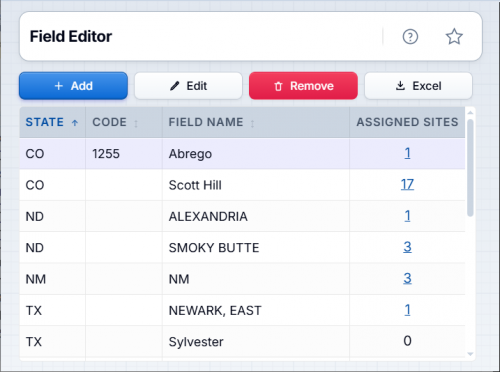
All sites must have a regulatory field assigned to them. This process allows you to manage the fields and codes by state.
◄ Site

Contents
Where can I find it?
You can find this process on the main menu under Site | Field Editor or by using the screen search at the top of the screen.
How do I use it?
When the field editor screen is displayed it will list all of the currently defined fields. You may add, edit, and/or remove fields and their codes by using the buttons at the top of the screen. You may also click the column headers to sort by any of the columns.
Adding a field
- Click the button labeled 'Add' at the top of the screen to open the Add Field popup window.
- Specify the name of the field, the regulatory code if needed and select the state the field is in from the dropdown.
- Click the button labeled 'Add' at the bottom of the popup window to add the field.
Editing an existing field
- Select the field you wish to edit and click the button labeled 'Edit' at the top of the screen to open the popup edit window.
- Make the necessary changes to the name or code. The state may not be changed.
- Click the button labeled 'Save Changes' in the popup window to save your changes.
Remove an existing field
- Select the field you wish to remove and click the button labeled 'Remove' at the top of the screen.
- Click 'Yes' in the removal confirmation dialog that is displayed.
Usage Notes
- The name of the field must be unique within a state.
- Field codes should be assigned based on the agency requirements
- You may not remove a field record unless no sites are currently assigned that field.
Copyright © 2026 by PRAMS Plus LLC. All Rights Reserved.