Difference between revisions of "BOF Factor Editor"
Jump to navigation
Jump to search
m (Protected "BOF Factor Editor" ([Edit=Allow only administrators] (indefinite) [Move=Allow only administrators] (indefinite))) |
Mark Bedish (talk | contribs) |
||
| Line 1: | Line 1: | ||
| − | ''The | + | ''Basic Orifice Meter (BOF) factors are used to calculate gas production volumes measured by chart meters. The values entered in this process are used to define the factor when setting up the meter in Site Maintenance. |
---- | ---- | ||
◄ [[Tools]] | ◄ [[Tools]] | ||
| − | + | [[File:Tools - BOF Factor Editor.png|border|500px|right]] | |
| − | |||
| − | |||
| − | |||
| − | [[File:Tools - BOF Factor Editor.png|border|500px]] | ||
| − | |||
| − | |||
| − | |||
| − | |||
| − | |||
| − | |||
| − | |||
| + | ==== Where can I find it? ==== | ||
| + | You can find this process on the main menu under Tools | BOF Factor Editor or by using the screen search at the top of the screen. | ||
| + | ==== How do I use it? ==== | ||
| + | The standard BOF factors have already been defined and exist. The primary purpose of this process is to add new BOF factors for different sized run size, tap types, and orifice sizes values. You can add, edit and remove any BOF factor setup using this process. You must have permission to use this process. | ||
| + | ==== Adding a new BOF factor ==== | ||
| + | *Click the button labeled 'Add' at the top of the screen to open a popup window to enter the factor information. | ||
| + | *Specify the run size, tap type, orifice and the corresponding factor. | ||
| + | *Click the button labeled 'Add' in the popup window to save the new BOF factor. | ||
| + | ==== Editing an existing meter factor ==== | ||
| + | *Select the row in the grid containing the BOF factor you want to edit. | ||
| + | *Click the button labeled 'Edit' at the top of the screen to open a popup window to edit the factor information. | ||
| + | *Make the necessary changes to the run size, tap type, orifice, or BOF Factor. | ||
| + | *Click the button labeled 'Save Changes' in the popup window to save the changes. | ||
| + | ==== Removing an existing meter factor ==== | ||
| + | *Select the row in the grid containing the BOF factor you want to remove. | ||
| + | *Click the button labeled 'Remove' at the top of the screen. A confirmation popup window will be shown. | ||
| + | *Click the button labeled 'Yes' in the popup window to complete the removal of the meter factor. | ||
| + | ==== What are run size, tap type and orifice ==== | ||
| + | ;Run Size:The inside diameter of the meter tube (pipe) where the orifice plate is installed. | ||
| + | ;Tap Type:The tap type describes where the differential pressure taps are located relative to the orifice plate. The most common ones are Pipe and Flange. | ||
| + | ;Orifice:The orifice is the diameter of the hole in the orifice plate. | ||
Copyright © {{CURRENTYEAR}} by PRAMS Plus LLC. All Rights Reserved. | Copyright © {{CURRENTYEAR}} by PRAMS Plus LLC. All Rights Reserved. | ||
Revision as of 13:53, 3 June 2026
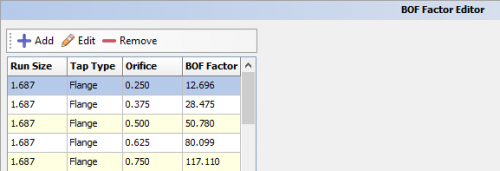
Basic Orifice Meter (BOF) factors are used to calculate gas production volumes measured by chart meters. The values entered in this process are used to define the factor when setting up the meter in Site Maintenance.
◄ Tools

Contents
Where can I find it?
You can find this process on the main menu under Tools | BOF Factor Editor or by using the screen search at the top of the screen.
How do I use it?
The standard BOF factors have already been defined and exist. The primary purpose of this process is to add new BOF factors for different sized run size, tap types, and orifice sizes values. You can add, edit and remove any BOF factor setup using this process. You must have permission to use this process.
Adding a new BOF factor
- Click the button labeled 'Add' at the top of the screen to open a popup window to enter the factor information.
- Specify the run size, tap type, orifice and the corresponding factor.
- Click the button labeled 'Add' in the popup window to save the new BOF factor.
Editing an existing meter factor
- Select the row in the grid containing the BOF factor you want to edit.
- Click the button labeled 'Edit' at the top of the screen to open a popup window to edit the factor information.
- Make the necessary changes to the run size, tap type, orifice, or BOF Factor.
- Click the button labeled 'Save Changes' in the popup window to save the changes.
Removing an existing meter factor
- Select the row in the grid containing the BOF factor you want to remove.
- Click the button labeled 'Remove' at the top of the screen. A confirmation popup window will be shown.
- Click the button labeled 'Yes' in the popup window to complete the removal of the meter factor.
What are run size, tap type and orifice
- Run Size
- The inside diameter of the meter tube (pipe) where the orifice plate is installed.
- Tap Type
- The tap type describes where the differential pressure taps are located relative to the orifice plate. The most common ones are Pipe and Flange.
- Orifice
- The orifice is the diameter of the hole in the orifice plate.
Copyright © 2026 by PRAMS Plus LLC. All Rights Reserved.